How do I enroll my Mysa thermostat in BC Hydro's Peak Saver program?
Last updated: November 11, 2026
Context
If you're looking to enroll your Mysa thermostat in BC Hydro's Peak Saver program but can't find the option in the app, this article will walk you through how to enable in-app enrollment and how to enroll via the web portal.
Answer
Before enrolling, make sure your Mysa thermostat is properly installed and paired with the Mysa app, and that the name and email address on your Mysa account match your BC Hydro account information.
To enable in-app enrollment:
Open the Mysa app and tap Settings at the bottom of the home screen (or open the side Menu > Manage Homes and select your home on earlier app versions)
Tap Edit Home
Ensure a home address is added
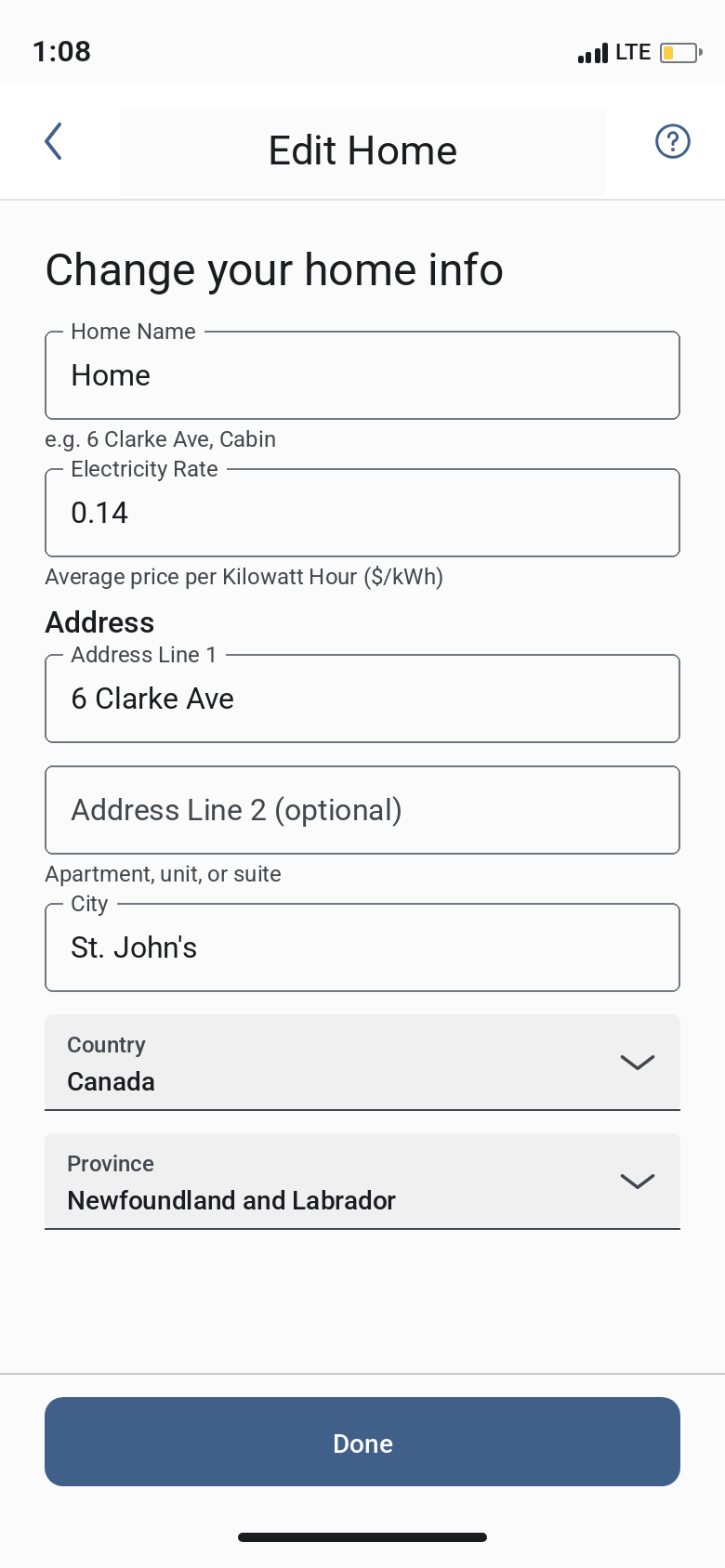
Once an address is saved, the Peak Saver enrollment option should appear in the app.
To enroll via the web portal:
Visit the BC Hydro Peak Saver enrollment portal at https://enroll.mysa.cloud/dr/auth/login
Log in using your Mysa account credentials
Complete the enrollment request through the portal
Once submitted, BC Hydro will review and approve your application. You'll receive a Welcome Email confirming your enrollment and eligibility for the next Peak Saver season, which begins in November.
If you continue to experience issues with enrollment, please reach out to our support team for further assistance.