Installing Mysa Smart Thermostat with Hot Water Baseboard Heating and Zone Valves
Last updated: September 2, 2026
If you have a hot water baseboard heating system with zone valves, you'll need to install the Mysa C-Wire Power Adapter at the zone valve location rather than at the thermostat wall location. This setup is common with oil burner systems that use 24V zone valves to control heating zones.
What You'll Need
Mysa Smart Thermostat
Mysa C-Wire Power Adapter (one per zone)
Access to your zone valve location (typically near your heating equipment)
24V AC transformer (usually already present in your system)
Installation Overview
Unlike standard thermostat installations, this setup requires all wiring connections to be made at the zone valve location, not at the wall thermostat location. The thermostat itself will be the only component installed at the wall.
Wiring Configuration
After completing the physical wiring, you'll need to configure the thermostat with the correct control code. For hot water baseboard heating systems with zone valves, use configuration code 40A. To set this code, press and hold the left and right arrow buttons on the thermostat until "PREF" is displayed, then use the right arrow button to scroll through options until you see the 3-digit code.
Follow this wiring diagram for each zone valve in your system:
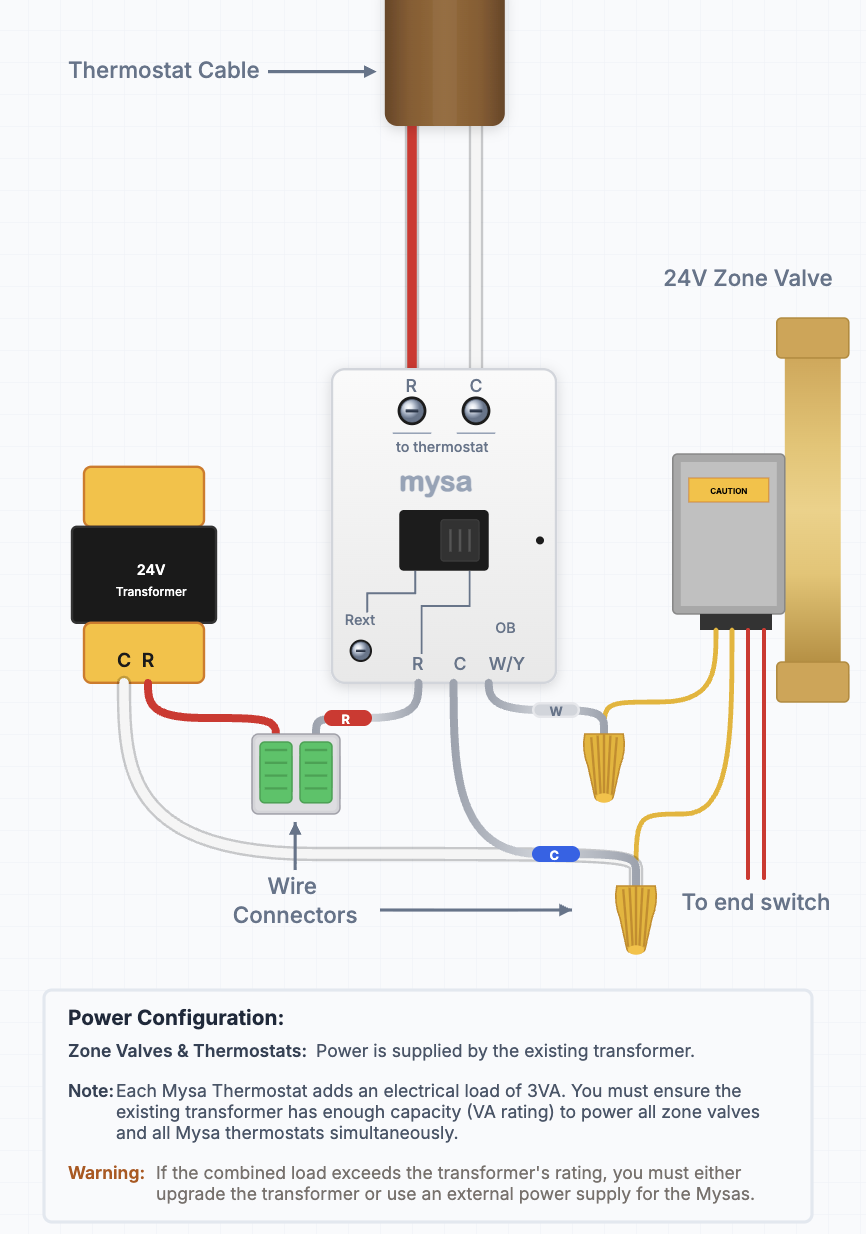
The diagram shows how to connect:
24V transformer to provide power
Mysa C-Wire Power Adapter
Zone valve connections
Thermostat wire connections (R, C, W, OB terminals)
When connecting the wires from the C-Wire Power Adapter to your Mysa thermostat at the wall location, connect them to the Rc and C terminals on the right side of the thermostat (not Rh on the left side). The R wire from the adapter connects to Rc, and the C wire from the adapter connects to C.
Multiple Zones
If you have multiple heating zones, you'll need to repeat this same wiring configuration for each zone valve, using one Mysa C-Wire Power Adapter per zone.
Before You Begin
Safety First: Always turn off power to your heating system at the breaker panel or HVAC equipment switch before beginning any wiring work.
Getting Help
For detailed installation guidance:
Download the Mysa app first - it provides interactive installation guidance
Visit the Installation Guide
Contact Mysa support if you need assistance identifying your specific system components or wiring configuration
When contacting support, it's helpful to provide photos of both your existing thermostat wiring and your zone valve/heating equipment area.